In the high-stakes environment of a 2026 trade show, a blank screen is a billboard for failure. With the average cost of a B2B trade show lead rising to $285 (CEIR, 2025), your audio-visual (AV) setup is not just a display tool—it is the digital heartbeat of your booth.
However, selecting a trade show TV stand and the accompanying monitor is fraught with expensive traps. Exhibitors frequently overpay for drayage on heavy steel stands, rent low-quality monitors from General Service Contractors (GSC) at a 300% markup, or bring residential TVs that are too dim to be seen under convention hall lighting.
This guide provides a technical and logistical blueprint for choosing the right trade show TV stand and monitor combination to maximize visibility and minimize “hidden” logistics costs.

Part 1: The Screen – Commercial vs. Residential Displays
The biggest mistake exhibitors make is buying a standard “Black Friday” 4K TV from a big-box retailer and expecting it to perform on the expo floor.
1. The Brightness War: Nits Matter
Convention centers use high-intensity metal halide or LED overhead lighting. A standard residential TV usually puts out 250–350 nits of brightness. Under expo lights, this looks washed out and grey.
- The 2026 Standard: You need a Commercial Display with a minimum of 500 nits (ideally 700+). High brightness ensures your content “pops” and stops traffic from the aisle.
2. Duty Cycle and Overheating
- Residential TVs: Rated for 6–8 hours of daily use in climate-controlled homes.
- Commercial Displays: Rated for $16/7$ or $24/7$ operation. They feature heavy-duty cooling fans and thermal management. Using a residential TV for 10 hours a day in a dusty, hot trade show booth often leads to panel failure or “ghosting.”
3. The Glare Factor
Residential TVs often use glossy screens to make colors pop in dark living rooms. In a trade show, a glossy screen acts like a mirror, reflecting the overhead lights and making your content unreadable.
- The Solution: Commercial displays come with Haze levels (Anti-Glare) of 25% to 44%, diffusing reflections to ensure readability from all angles.
4. VESA Compatibility
Standard trade show TV stands use VESA mounting patterns (e.g., $400 \times 400$mm). Cheap consumer TVs sometimes use proprietary or irregular bolt patterns that require expensive custom adapters to fit your rental stand.
Part 2: The Backbone – Choosing the Right Trade Show TV Stand
The stand dictates the safety, aesthetics, and logistics cost of your display. In 2026, the market is split between “Heavy Industrial” and “Portable Aluminum.”
1. The Logistics Trap: Weight vs. Stability
A 100-lb steel stand might feel sturdy, but it attracts massive drayage fees.
- The Drayage Calculation:$$\text {Cost} = (\text{Weight in CWT}) \times \text{Venue Rate}$$If the rate is $200 per CWT (100 lbs), a steel stand costing $300 to buy will cost you **$200 per show** just to move from the dock to your booth.
The Solution: Look for Aluminum Extrusion Stands or Tension Fabric Kiosks. These weigh 20–30 lbs, offer similar stability via wide footprints, and can often be carried in by hand (POV), bypassing drayage entirely.
2. Stand Styles and Functionality
| Stand Type | Best Application | Pros | Cons |
| Dual-Post (Truss) | Industrial/Tech Booths | Extremely stable; holds heavy screens (80″+). | Heavy; industrial look may not fit all brands. |
| Single-Column Pedestal | 10×10 or Retail Booths | Sleek; small footprint; often tool-less. | Weight limit usually ~55″; less stable in high traffic. |
| Monitor Kiosk (Fabric) | High-End Branding | Hides all cables; doubles as a billboard. | More expensive upfront; requires assembly time. |
| Backwall Mount | Small Inline Booths | Zero floor footprint; maximizes space. | Requires a sturdy frame; cannot be moved easily. |
3. Integrated Shelving
If you plan to run your content from a laptop or media player, ensure your trade show TV stand has a lockable storage cabinet or a sturdy shelf. “Dangling dongles” are unprofessional and a theft risk.
Part 3: Rent vs. Buy – The GSC Equation
Should you rent your TV and stand from the General Service Contractor (Freeman, GES, etc.) or bring your own?
When to Rent (GSC)
- Frequency: You exhibit 1 time per year.
- Logistics: You have no way to ship or store a large crate.
- Support: You need a 24-hour guarantee. If a rental TV dies, the GSC replaces it within the hour.
- The Cost Reality: You will pay a premium (often 50% of the purchase price for a 3-day rental), but drayage and labor are usually included.
When to Buy (Own)
- Frequency: You exhibit 3+ times per year.
- Branding: You need a specific look (e.g., a white stand to match your Apple-style booth).
- Tech Specs: You need specific inputs (SDI, DisplayPort) or 4K/8K resolution that GSC rentals often lack.
- ROI Threshold: The break-even point for owning a lightweight aluminum stand and a 50″ commercial monitor is typically 2.5 shows.
Part 4: Setup, Safety, and Connectivity
Once you have the hardware, the installation determines success.
1. Stability and Safety
Trade show floors are chaotic. A wobbly stand is a lawsuit waiting to happen.
- The “Bump Test”: If you buy a lightweight stand, ensure it has a large base plate.
- Tape it Down: Use gaffer tape on the edges of the base plate if it sits under the carpet to prevent shifting.
2. Cable Management (The Professional Polish)
Nothing ruins a sleek trade show TV stand faster than a “spaghetti” of HDMI and power cables.
- Internal Routing: Buy stands with hollow pillars that allow cables to run inside the pole.
- Velcro/Zip Ties: If external routing is necessary, use color-matched Velcro ties every 6 inches.
3. The “No-Smart-TV” Rule
Avoid Smart TVs.
- Why: Smart TVs constantly try to connect to the venue’s open Wi-Fi, popping up “Connection Lost” boxes in the middle of your demo.
- The Fix: Use “Dumb” Commercial Monitors or ensure your TV has a “Hospitality Mode” that locks out on-screen menus and Wi-Fi searching.
- If your company uses features such as infrared control, media interaction, and multi-device local network collaboration, please disregard this entry.
Part 5: Content Strategy – Landscape vs. Portrait
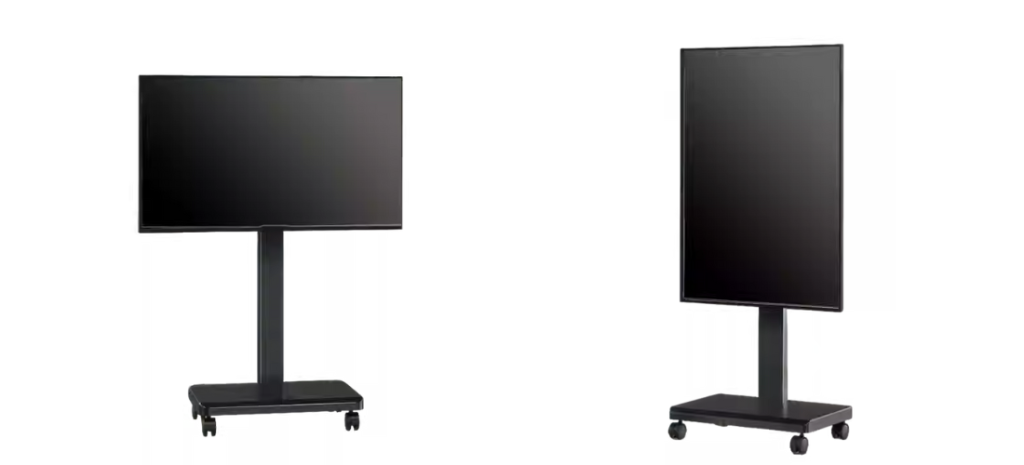
Your trade show TV stand hardware usually supports rotation. Which orientation wins in 2026?
Landscape (16:9)
- Best for: Product demos, software dashboards, and long-form cinematic videos.
- Placement: Best used on backwalls or large truss stands.
Portrait (9:16)
- Best for: Social media-style content, digital signage, and “digital mannequins.”
- Why it works: It mimics the mobile phone experience. 60% of Gen Z and Millennial buyers are more likely to stop for vertical, fast-moving content (Trade Show Display Pros, 2026).
- Hardware Note: Ensure your commercial display is rated for “Portrait Mode.” Residential TVs often overheat if mounted vertically because their vents are designed for horizontal airflow.
Conclusion: The Ultimate Hardware Checklist
Before your next show, run this audit on your AV plan:
- Brightness Check: Is your monitor at least 500 nits?
- Weight Check: Is your trade show TV stand under 30 lbs to save drayage?
- VESA Check: Does your mount pattern match your screen?
- Cable Check: Do you have a 15ft HDMI cable and a dedicated power strip?
- Mode Check: Is the TV set to “Retail/Store” mode to prevent auto-dimming?
By treating your trade show TV stand and monitor as an integrated system rather than an afterthought, you turn a passive screen into an active lead-generation magnet.
References
- AVFX (2025) Commercial vs. Consumer Displays in Events. [Online] Available at: https://www.avfx.com/
- CEIR (2025) 2025 Spend Report: Where Exhibitor Dollars Go. [Online] Available at: https://ceir.iaee.com/
- Giant Printing (2025) The Cost of Drayage: 2025 Industry Averages. [Online] Available at: https://giantprinting.com/
- Trade Show Display Pros (2026) Digital Signage Trends: Vertical Video in B2B. [Online] Available at: https://www.tradeshowdisplaypros.com/